Mostrando entradas con la etiqueta fontawesome icons. Mostrar todas las entradas

En este tutorial les voy a mostrar cómo realizar un formulario Login de Usuario utilizando el lenguaje de programación C# .NET en Visual Studio 2022. Utilizaremos el NET FRAMEWORK 4.8, componentes de ADO.NET, como base de datos usaremos SQL Server 2019. El desarrollo de la aplicación tendrá una Arquitectura en Capas (Entidades, Acceso a Datos, Negocio y Presentación) . Además, diseñaremos una interfaz moderna con las librerías MetroFramework + FontAwesome Icons.

Extra:

  1. Envío de datos de sesión a formulario principal.
  2. Hasheo de password utilizando el algoritmo de encriptación SHA2 512

Estructura del Proyecto


1. Creación de la Base de Datos


USE master
GO
IF EXISTS (
    SELECT [name]
        FROM sys.databases
        WHERE [name] = N'Trujillosoft'
)
DROP DATABASE Trujillosoft
GO
CREATE DATABASE Trujillosoft
GO

1.1 Creación de Tabla Usuario


USE Trujillosoft
GO
CREATE TABLE dbo.Usuario (
  id int NOT NULL IDENTITY (1, 1),
  idUsuario varchar(10) NOT NULL PRIMARY KEY,
  dsUsuario varchar(100) NULL,
  dsPassword binary(64) NULL,
  idEstado char(1) NOT NULL,
  idUsuCreacion varchar(10) NOT NULL,
  feCreacion datetime NOT NULL,
  idUsuModificacion varchar(10) NOT NULL,
  feModificacion datetime NOT NULL
)
GO

1.2 Insertando Datos en la Tabla Usuario


INSERT INTO [dbo].[Usuario]
( -- Columnas
 idUsuario,dsUsuario,dsPassword,idEstado,idUsuCreacion,feCreacion,idUsuModificacion,feModificacion
)
VALUES
( -- Valores
 'ADM','Administrador',HASHBYTES('SHA2_512','123456'),'A','ADM',GETDATE(),'ADM',GETDATE()
)
GO

1.3 Creando Procedimiento Almacenado de Validación de Login


CREATE PROCEDURE dbo.uspUsuarioLogin
(
    @idUsuario varchar(10),
    @dsPassword varchar(50)
)
AS
BEGIN
    SET NOCOUNT ON

    SELECT id,idUsuario,dsUsuario,dsPassword,idEstado,idUsuCreacion,feCreacion,idUsuModificacion,feModificacion
    FROM dbo.Usuario
    WHERE idUsuario = @idUsuario
    AND dsPassword = HASHBYTES('SHA2_512',@dsPassword)
    AND idEstado = 'A'
END
GO

2. Capa de Entidades

2.1 E_Usuario.cs

Clase que contendrá las propiedades de la entidad Usuario


using System;
using System.Collections.Generic;
using System.Linq;
using System.Text;
using System.Threading.Tasks;

namespace Entidades
{
    public class E_Usuario
    {
        public int id { get; set; } 
        public string idUsuario { get; set; }
        public string dsUsuario { get; set; }
        public string dsPassword { get; set; }
        public string idEstado { get; set; }
        public string idUsuCreacion { get; set; }
        public DateTime feCreacion { get; set; }
        public string idUsuModificacion { get; set; }
        public DateTime feModificacion { get; set; }
        
    }

}

3. Capa de Acceso a Datos

En esta capa se debe agregar la referencia a la capa de Entidades. Además, se debe tener instalado la librería de System.Data.SqlClient desde el administrador de paquetes NuGet


3.1 D_Base.cs

Clase base que tendrá la cadena de conexión a la base de datos SQL Server


using System;
using System.Collections.Generic;
using System.Linq;
using System.Text;
using System.Threading.Tasks;

namespace Datos
{
    public class D_Base
    {
        public static string strCadenaConexion = @"
            SERVER = LAPTOP-JS5QEV6S\SQL2019EXPRESS;
            DATABASE = Trujillosoft;
            USER ID= userbd;
            PASSWORD= userbd
        ";
    }
}

3.2 D_Usuario.cs

Clase que contendrá la función de validación de login a través de un procedimiento almacenado, de ser exitoso el inicio de sesión, retornará datos del usuario logueado.


using System;
using System.Collections.Generic;
using System.Linq;
using System.Text;
using System.Threading.Tasks;
using Entidades;
using System.Data;
using System.Data.SqlClient;

namespace Datos
{
    public class D_Usuario: D_Base
    {
        public static E_Usuario Login(string strUsuario, string strPassword)
        {
            try
            {
                using (SqlConnection cn = new SqlConnection(strCadenaConexion))
                {
                    cn.Open();
                    using (SqlCommand cmd = new SqlCommand("uspUsuarioLogin", cn))
                    {
                        cmd.CommandType = CommandType.StoredProcedure;
                        cmd.Parameters.AddWithValue("@idUsuario",strUsuario);
                        cmd.Parameters.AddWithValue("@dsPassword", strPassword);

                        using (SqlDataReader dr = cmd.ExecuteReader())
                        {
                            E_Usuario Usuario;
                            List<E_Usuario> lstUsuario = new List<E_Usuario>();
                            while (dr.Read())
                            {
                                Usuario = new E_Usuario();
                                Usuario.id = Convert.ToInt32(dr["id"]);
                                Usuario.idUsuario = Convert.ToString(dr["idUsuario"]);
                                Usuario.dsUsuario = Convert.ToString(dr["dsUsuario"]);
                                lstUsuario.Add(Usuario);
                            }
                            return lstUsuario.FirstOrDefault();
                        }

                    }

                }
            }
            catch (Exception ex)
            {

                throw ex;
            }

        }
    }
}


4. Capa de Negocio

En esta capa se debe agregar la referencia a la capa de Datos y Entidades

4.1 N_Usuario.cs


using System;
using System.Collections.Generic;
using System.Linq;
using System.Text;
using System.Threading.Tasks;
using Entidades;
using Datos;


namespace Negocio
{
    public class N_Usuario
    {
        public static E_Usuario Login(string strUsuario, string strPassword)
        {
            return D_Usuario.Login(strUsuario,strPassword);
        }
    }
}

5. Capa de Presentación

En esta capa se debe agregar la referencia a la capa de Negocio y Entidades. Además, debe estar configurado como proyecto de inicio.

5.1 Requisitos

Instalar desde el administrador de paquetes NuGet:


5.2 Diseño Login


5.3 frmLogin.cs

Clase que contendrá la lógica de interfaz de usuario de login


using System;
using System.Collections.Generic;
using System.Linq;
using System.Text;
using System.Threading.Tasks;
using MetroFramework.Forms;
using MetroFramework;
using FontAwesome.Sharp;
using System.Drawing;
using Entidades;
using Negocio;
using System.Windows.Forms;


namespace Presentacion
{
    public class frmLogin: MetroForm
    {
        private IconPictureBox pbxLogin;
        private MetroFramework.Controls.MetroPanel pnlLineaSuperior;
        private MetroFramework.Controls.MetroPanel pnlLineaInferior;
        private MetroFramework.Controls.MetroLabel lblUsuario;
        private MetroFramework.Controls.MetroLabel lblPassword;
        private MetroFramework.Controls.MetroTextBox txtUsuario;
        private MetroFramework.Controls.MetroTextBox txtPassword;
        private IconButton btnIniciarSesion;
        private MetroFramework.Controls.MetroPanel pnlLateral;

        public frmLogin() {
            InitializeComponent();
            CargarIconos();
        }

        #region Diseño
        private void InitializeComponent()
        {
            System.ComponentModel.ComponentResourceManager resources = new System.ComponentModel.ComponentResourceManager(typeof(frmLogin));
            this.pnlLateral = new MetroFramework.Controls.MetroPanel();
            this.pbxLogin = new FontAwesome.Sharp.IconPictureBox();
            this.pnlLineaSuperior = new MetroFramework.Controls.MetroPanel();
            this.pnlLineaInferior = new MetroFramework.Controls.MetroPanel();
            this.lblUsuario = new MetroFramework.Controls.MetroLabel();
            this.lblPassword = new MetroFramework.Controls.MetroLabel();
            this.txtUsuario = new MetroFramework.Controls.MetroTextBox();
            this.txtPassword = new MetroFramework.Controls.MetroTextBox();
            this.btnIniciarSesion = new FontAwesome.Sharp.IconButton();
            ((System.ComponentModel.ISupportInitialize)(this.pbxLogin)).BeginInit();
            this.SuspendLayout();
            // 
            // pnlLateral
            // 
            this.pnlLateral.BackgroundImage = ((System.Drawing.Image)(resources.GetObject("pnlLateral.BackgroundImage")));
            this.pnlLateral.BackgroundImageLayout = System.Windows.Forms.ImageLayout.Stretch;
            this.pnlLateral.HorizontalScrollbarBarColor = true;
            this.pnlLateral.HorizontalScrollbarHighlightOnWheel = false;
            this.pnlLateral.HorizontalScrollbarSize = 10;
            this.pnlLateral.Location = new System.Drawing.Point(0, 4);
            this.pnlLateral.Name = "pnlLateral";
            this.pnlLateral.Size = new System.Drawing.Size(460, 500);
            this.pnlLateral.TabIndex = 0;
            this.pnlLateral.VerticalScrollbarBarColor = true;
            this.pnlLateral.VerticalScrollbarHighlightOnWheel = false;
            this.pnlLateral.VerticalScrollbarSize = 10;
            // 
            // pbxLogin
            // 
            this.pbxLogin.BackColor = System.Drawing.Color.FromArgb(((int)(((byte)(255)))), ((int)(((byte)(255)))), ((int)(((byte)(255)))));
            this.pbxLogin.ForeColor = System.Drawing.SystemColors.ControlText;
            this.pbxLogin.IconChar = FontAwesome.Sharp.IconChar.UserShield;
            this.pbxLogin.IconColor = System.Drawing.SystemColors.ControlText;
            this.pbxLogin.IconFont = FontAwesome.Sharp.IconFont.Auto;
            this.pbxLogin.IconSize = 132;
            this.pbxLogin.Location = new System.Drawing.Point(568, 63);
            this.pbxLogin.Name = "pbxLogin";
            this.pbxLogin.Size = new System.Drawing.Size(139, 132);
            this.pbxLogin.TabIndex = 1;
            this.pbxLogin.TabStop = false;
            // 
            // pnlLineaSuperior
            // 
            this.pnlLineaSuperior.BackColor = System.Drawing.Color.Gray;
            this.pnlLineaSuperior.HorizontalScrollbarBarColor = true;
            this.pnlLineaSuperior.HorizontalScrollbarHighlightOnWheel = false;
            this.pnlLineaSuperior.HorizontalScrollbarSize = 10;
            this.pnlLineaSuperior.Location = new System.Drawing.Point(487, 249);
            this.pnlLineaSuperior.Name = "pnlLineaSuperior";
            this.pnlLineaSuperior.Size = new System.Drawing.Size(300, 1);
            this.pnlLineaSuperior.TabIndex = 2;
            this.pnlLineaSuperior.UseCustomBackColor = true;
            this.pnlLineaSuperior.VerticalScrollbarBarColor = true;
            this.pnlLineaSuperior.VerticalScrollbarHighlightOnWheel = false;
            this.pnlLineaSuperior.VerticalScrollbarSize = 10;
            // 
            // pnlLineaInferior
            // 
            this.pnlLineaInferior.BackColor = System.Drawing.Color.Gray;
            this.pnlLineaInferior.HorizontalScrollbarBarColor = true;
            this.pnlLineaInferior.HorizontalScrollbarHighlightOnWheel = false;
            this.pnlLineaInferior.HorizontalScrollbarSize = 10;
            this.pnlLineaInferior.Location = new System.Drawing.Point(487, 412);
            this.pnlLineaInferior.Name = "pnlLineaInferior";
            this.pnlLineaInferior.Size = new System.Drawing.Size(300, 1);
            this.pnlLineaInferior.TabIndex = 3;
            this.pnlLineaInferior.UseCustomBackColor = true;
            this.pnlLineaInferior.VerticalScrollbarBarColor = true;
            this.pnlLineaInferior.VerticalScrollbarHighlightOnWheel = false;
            this.pnlLineaInferior.VerticalScrollbarSize = 10;
            // 
            // lblUsuario
            // 
            this.lblUsuario.AutoSize = true;
            this.lblUsuario.Location = new System.Drawing.Point(507, 277);
            this.lblUsuario.Name = "lblUsuario";
            this.lblUsuario.Size = new System.Drawing.Size(56, 20);
            this.lblUsuario.TabIndex = 4;
            this.lblUsuario.Text = "Usuario";
            // 
            // lblPassword
            // 
            this.lblPassword.AutoSize = true;
            this.lblPassword.Location = new System.Drawing.Point(507, 318);
            this.lblPassword.Name = "lblPassword";
            this.lblPassword.Size = new System.Drawing.Size(66, 20);
            this.lblPassword.TabIndex = 5;
            this.lblPassword.Text = "Password";
            // 
            // txtUsuario
            // 
            this.txtUsuario.BackColor = System.Drawing.Color.LightGray;
            // 
            // 
            // 
            this.txtUsuario.CustomButton.Image = null;
            this.txtUsuario.CustomButton.Location = new System.Drawing.Point(167, 2);
            this.txtUsuario.CustomButton.Name = "";
            this.txtUsuario.CustomButton.Size = new System.Drawing.Size(27, 27);
            this.txtUsuario.CustomButton.Style = MetroFramework.MetroColorStyle.Blue;
            this.txtUsuario.CustomButton.TabIndex = 1;
            this.txtUsuario.CustomButton.Theme = MetroFramework.MetroThemeStyle.Light;
            this.txtUsuario.CustomButton.UseSelectable = true;
            this.txtUsuario.CustomButton.Visible = false;
            this.txtUsuario.DisplayIcon = true;
            this.txtUsuario.FontSize = MetroFramework.MetroTextBoxSize.Medium;
            this.txtUsuario.Lines = new string[0];
            this.txtUsuario.Location = new System.Drawing.Point(590, 270);
            this.txtUsuario.MaxLength = 32767;
            this.txtUsuario.Name = "txtUsuario";
            this.txtUsuario.PasswordChar = '\0';
            this.txtUsuario.PromptText = "Ingrese usuario";
            this.txtUsuario.ScrollBars = System.Windows.Forms.ScrollBars.None;
            this.txtUsuario.SelectedText = "";
            this.txtUsuario.SelectionLength = 0;
            this.txtUsuario.SelectionStart = 0;
            this.txtUsuario.ShortcutsEnabled = true;
            this.txtUsuario.Size = new System.Drawing.Size(197, 32);
            this.txtUsuario.TabIndex = 6;
            this.txtUsuario.UseCustomBackColor = true;
            this.txtUsuario.UseSelectable = true;
            this.txtUsuario.WaterMark = "Ingrese usuario";
            this.txtUsuario.WaterMarkColor = System.Drawing.Color.FromArgb(((int)(((byte)(109)))), ((int)(((byte)(109)))), ((int)(((byte)(109)))));
            this.txtUsuario.WaterMarkFont = new System.Drawing.Font("Segoe UI", 12F, System.Drawing.FontStyle.Italic, System.Drawing.GraphicsUnit.Pixel);
            // 
            // txtPassword
            // 
            this.txtPassword.BackColor = System.Drawing.Color.LightGray;
            // 
            // 
            // 
            this.txtPassword.CustomButton.Image = null;
            this.txtPassword.CustomButton.Location = new System.Drawing.Point(167, 2);
            this.txtPassword.CustomButton.Name = "";
            this.txtPassword.CustomButton.Size = new System.Drawing.Size(27, 27);
            this.txtPassword.CustomButton.Style = MetroFramework.MetroColorStyle.Blue;
            this.txtPassword.CustomButton.TabIndex = 1;
            this.txtPassword.CustomButton.Theme = MetroFramework.MetroThemeStyle.Light;
            this.txtPassword.CustomButton.UseSelectable = true;
            this.txtPassword.CustomButton.Visible = false;
            this.txtPassword.DisplayIcon = true;
            this.txtPassword.FontSize = MetroFramework.MetroTextBoxSize.Medium;
            this.txtPassword.Lines = new string[0];
            this.txtPassword.Location = new System.Drawing.Point(590, 311);
            this.txtPassword.MaxLength = 32767;
            this.txtPassword.Name = "txtPassword";
            this.txtPassword.PasswordChar = '●';
            this.txtPassword.PromptText = "Ingrese password";
            this.txtPassword.ScrollBars = System.Windows.Forms.ScrollBars.None;
            this.txtPassword.SelectedText = "";
            this.txtPassword.SelectionLength = 0;
            this.txtPassword.SelectionStart = 0;
            this.txtPassword.ShortcutsEnabled = true;
            this.txtPassword.Size = new System.Drawing.Size(197, 32);
            this.txtPassword.TabIndex = 7;
            this.txtPassword.UseCustomBackColor = true;
            this.txtPassword.UseSelectable = true;
            this.txtPassword.UseSystemPasswordChar = true;
            this.txtPassword.WaterMark = "Ingrese password";
            this.txtPassword.WaterMarkColor = System.Drawing.Color.FromArgb(((int)(((byte)(109)))), ((int)(((byte)(109)))), ((int)(((byte)(109)))));
            this.txtPassword.WaterMarkFont = new System.Drawing.Font("Segoe UI", 12F, System.Drawing.FontStyle.Italic, System.Drawing.GraphicsUnit.Pixel);
            // 
            // btnIniciarSesion
            // 
            this.btnIniciarSesion.BackColor = System.Drawing.Color.DodgerBlue;
            this.btnIniciarSesion.FlatAppearance.BorderColor = System.Drawing.Color.Aqua;
            this.btnIniciarSesion.FlatStyle = System.Windows.Forms.FlatStyle.Flat;
            this.btnIniciarSesion.ForeColor = System.Drawing.Color.White;
            this.btnIniciarSesion.IconChar = FontAwesome.Sharp.IconChar.ArrowCircleRight;
            this.btnIniciarSesion.IconColor = System.Drawing.Color.White;
            this.btnIniciarSesion.IconFont = FontAwesome.Sharp.IconFont.Auto;
            this.btnIniciarSesion.IconSize = 28;
            this.btnIniciarSesion.ImageAlign = System.Drawing.ContentAlignment.MiddleRight;
            this.btnIniciarSesion.Location = new System.Drawing.Point(590, 353);
            this.btnIniciarSesion.Name = "btnIniciarSesion";
            this.btnIniciarSesion.Size = new System.Drawing.Size(197, 37);
            this.btnIniciarSesion.TabIndex = 8;
            this.btnIniciarSesion.Text = "Iniciar Sesion";
            this.btnIniciarSesion.UseVisualStyleBackColor = false;
            this.btnIniciarSesion.Click += new System.EventHandler(this.btnIniciarSesion_Click);
            // 
            // frmLogin
            // 
            this.ClientSize = new System.Drawing.Size(800, 500);
            this.Controls.Add(this.btnIniciarSesion);
            this.Controls.Add(this.txtPassword);
            this.Controls.Add(this.txtUsuario);
            this.Controls.Add(this.lblPassword);
            this.Controls.Add(this.lblUsuario);
            this.Controls.Add(this.pnlLineaInferior);
            this.Controls.Add(this.pnlLineaSuperior);
            this.Controls.Add(this.pbxLogin);
            this.Controls.Add(this.pnlLateral);
            this.MaximizeBox = false;
            this.MinimizeBox = false;
            this.Name = "frmLogin";
            this.Resizable = false;
            this.TopMost = true;
            ((System.ComponentModel.ISupportInitialize)(this.pbxLogin)).EndInit();
            this.ResumeLayout(false);
            this.PerformLayout();

        }

        #endregion


        private void CargarIconos()
        {
            var imgUsuario = IconChar.User.ToBitmap(Color.DodgerBlue, 28);
            var imgPassword = IconChar.Lock.ToBitmap(Color.DodgerBlue, 28);

            txtUsuario.Icon = imgUsuario;
            txtPassword.Icon = imgPassword; 
        }

        private void btnIniciarSesion_Click(object sender, EventArgs e)
        {
            if (!ValidarUsuario())
                return;

            string strUsuario = txtUsuario.Text.Trim();
            string strPassword = txtPassword.Text.Trim();

            E_Usuario Usuario = N_Usuario.Login(strUsuario,strPassword);

            if (Usuario != null)
            {
                this.Hide();
                frmPrincipal frm = new frmPrincipal();
                frm.SESION_USUARIO = Usuario;
                frm.Show();
            }
            else
            {
                MetroMessageBox.Show(this, "Usuario o clave incorrecto", "Error",
                    MessageBoxButtons.OK, MessageBoxIcon.Error);

            }
        }

        private bool ValidarUsuario()
        {
            if (string.IsNullOrEmpty(txtUsuario.Text.Trim()))
            {
                MetroMessageBox.Show(this, "Ingrese usuario", "Error",
                    MessageBoxButtons.OK, MessageBoxIcon.Error);
                txtUsuario.Focus();
                return false;
            }
            if (string.IsNullOrEmpty(txtPassword.Text.Trim()))
            {
                MetroMessageBox.Show(this, "Ingrese password", "Error",
                    MessageBoxButtons.OK, MessageBoxIcon.Error);
                txtPassword.Focus();
                return false;
            }
            return true;
        }
    }
}


5.4 Diseño Formulario Principal


5.5 frmPrincipal.cs

Clase que contendrá la lógica de interfaz del formulario principal. En este formulario se recibirán los datos de inicio de sesión


using System;
using System.Collections.Generic;
using System.Linq;
using System.Text;
using System.Threading.Tasks;
using MetroFramework.Forms;
using Entidades;
using System.Windows.Forms;

namespace Presentacion
{
    public class frmPrincipal: MetroForm
    {
        public E_Usuario SESION_USUARIO { get; set; }

        private MetroFramework.Controls.MetroLabel lblUsuario;
        private MetroFramework.Controls.MetroLabel metroLabel1;

        public frmPrincipal()
        {
            InitializeComponent();
        }

        #region Diseño
        private void InitializeComponent()
        {
            this.metroLabel1 = new MetroFramework.Controls.MetroLabel();
            this.lblUsuario = new MetroFramework.Controls.MetroLabel();
            this.SuspendLayout();
            // 
            // metroLabel1
            // 
            this.metroLabel1.Anchor = ((System.Windows.Forms.AnchorStyles)((System.Windows.Forms.AnchorStyles.Top | System.Windows.Forms.AnchorStyles.Right)));
            this.metroLabel1.AutoSize = true;
            this.metroLabel1.FontWeight = MetroFramework.MetroLabelWeight.Bold;
            this.metroLabel1.Location = new System.Drawing.Point(653, 47);
            this.metroLabel1.Name = "metroLabel1";
            this.metroLabel1.Size = new System.Drawing.Size(87, 20);
            this.metroLabel1.TabIndex = 0;
            this.metroLabel1.Text = "Bienvenido";
            // 
            // lblUsuario
            // 
            this.lblUsuario.Anchor = ((System.Windows.Forms.AnchorStyles)((System.Windows.Forms.AnchorStyles.Top | System.Windows.Forms.AnchorStyles.Right)));
            this.lblUsuario.AutoSize = true;
            this.lblUsuario.FontWeight = MetroFramework.MetroLabelWeight.Bold;
            this.lblUsuario.Location = new System.Drawing.Point(758, 47);
            this.lblUsuario.Name = "lblUsuario";
            this.lblUsuario.Size = new System.Drawing.Size(80, 20);
            this.lblUsuario.TabIndex = 1;
            this.lblUsuario.Text = "lblUsuario";
            // 
            // frmPrincipal
            // 
            this.ClientSize = new System.Drawing.Size(1000, 800);
            this.Controls.Add(this.lblUsuario);
            this.Controls.Add(this.metroLabel1);
            this.MinimumSize = new System.Drawing.Size(750, 500);
            this.Name = "frmPrincipal";
            this.WindowState = System.Windows.Forms.FormWindowState.Maximized;
            this.FormClosing += new System.Windows.Forms.FormClosingEventHandler(this.frmPrincipal_FormClosing);
            this.Load += new System.EventHandler(this.frmPrincipal_Load);
            this.ResumeLayout(false);
            this.PerformLayout();

        }

        #endregion

        private void frmPrincipal_Load(object sender, EventArgs e)
        {
            lblUsuario.Text = SESION_USUARIO.dsUsuario;
        }

        private void frmPrincipal_FormClosing(object sender, FormClosingEventArgs e)
        {
            Application.Exit();
        }
    }
}


5.6 Program.cs

Configuramos la aplicación con el formulario de inicio frmLogin


using System;
using System.Collections.Generic;
using System.Linq;
using System.Threading.Tasks;
using System.Windows.Forms;

namespace Presentacion
{
    internal static class Program
    {
        /// 
        /// Punto de entrada principal para la aplicación.
        /// 
        [STAThread]
        static void Main()
        {
            Application.EnableVisualStyles();
            Application.SetCompatibleTextRenderingDefault(false);
            Application.Run(new frmLogin());
        }
    }
}

Video completo del tutorial en mi canal


En este tutorial les voy a mostrar cómo realizar un formulario CRUD (Create, Read, Update, Delete) utilizando el lenguaje de programación C# .NET en Visual Studio. Utilizaremos el NET FRAMEWORK 4.5.2, componentes de ADO.NET, como base de datos usaremos MySQL. El desarrollo de la aplicación tendrá una Arquitectura en Capas (Entidades, Acceso a Datos, Negocio y Presentación) . Además, el diseñaremos una interfaz moderna con las librerías MetroFramework + FontAwesome Icons.

Extra:

  1. Botones de Navegación en Barra de Herramientas para enlazar DataSource con Controles del Formulario
  2. Validaciones de campos obligatorios
  3. Query para generar correlativo de ID
  4. Ejemplo con Procedimiento Almacenado.

Estructura del Proyecto


1. Creación de la Base de Datos


create database tutorial;

1.1 Creación de la Tabla Cliente


create table Cliente(
	id int not null auto_increment,
	idCliente 	char(7) not null,
	dsCliente 	varchar(100) null,
	dsNumDoc 	varchar(50) null,
	dsSexo char(1) null,
	dsDireccion varchar(100) null,
	dsTelefono 	varchar(100) null,
	dsCorreo 	varchar(100)  null,
	feNacimiento date null,
	dsEstado char(1) not null,
	PRIMARY KEY (idCliente),
	KEY idx_id_cliente(id)
)ENGINE=InnoDB DEFAULT CHARSET=utf8;

2. Capa de Entidades: Crud.BusinessEntities

2.1 BE_Cliente.cs

Clase que contendrá las propiedades de la entidad Cliente


using System;
using System.Collections.Generic;
using System.Linq;
using System.Text;
using System.Threading.Tasks;

namespace Crud.BusinessEntities
{
    public class BE_Cliente
    {
        public int id { get; set; }
        public string idCliente { get; set; }
        public string dsCliente { get; set; }
        public string dsNumDoc { get; set; }
        public string dsSexo { get; set; }
        public string dsDireccion { get; set; }
        public string dsTelefono { get; set; }
        public string dsCorreo { get; set; }
        public DateTime feNacimiento { get; set; }
        public string dsEstado { get; set; }
    }
}
	

3. Capa de Acceso a Datos: Crud.DataAccess

En esta capa se debe agregar la referencia a la capa de entidades Crud.BusinessEntities y al conector de MySQL (Descargar conector desde la página oficial de MySQL AQUI). Cuando terminan de instalar el conector lo agregan desde Referencia >> Ensamblados >> Extensiones >> MySql.Data

3.1 DA_BaseClass.cs

Clase base que contendrá la cadena de conexión y funciones utilitarias:


using System;
using System.Collections.Generic;
using System.Linq;
using System.Text;
using System.Threading.Tasks;
using System.Data;
using MySql.Data.MySqlClient;

namespace Crud.DataAccess
{
    public class DA_BaseClass
    {
        public static string strCadenaConexion = "SERVER=localhost; DATABASE=tutorial;" +
            "UID=userbd; PASSWORD=123456";

        // devuelve un datatable a partir de una sentencia select
        public static DataTable GetDataTable(string strSQL)
        {
            try
            {
                using (MySqlConnection cn = new MySqlConnection(strCadenaConexion))
                {
                    cn.Open();
                    using (MySqlCommand cmd = new MySqlCommand(strSQL,cn))
                    {
                        using (MySqlDataReader dr = cmd.ExecuteReader())
                        {
                            DataTable dt = new DataTable();
                            dt.Load(dr);
                            return dt;
                        }
                    }

                }
            }
            catch (Exception)
            {

                throw;
            }
        }

        //Insert, udpate , delete
        public static bool ExecTransaction(string strSQL)
        {
            bool resultado = false;

            try
            {
                using (MySqlConnection cn = new MySqlConnection(strCadenaConexion))
                {
                    cn.Open();
                    using (MySqlTransaction trx = cn.BeginTransaction())
                    {
                        try
                        {
                            using (MySqlCommand cmd = new MySqlCommand(strSQL, cn))
                            {
                                cmd.Transaction = trx;
                                cmd.ExecuteNonQuery();
                            }
                            trx.Commit();
                            resultado = true;
                        }
                        catch (Exception)
                        {
                            trx.Rollback();
                            resultado = false;
                            throw;
                        }

                    }

                }
            }
            catch (Exception)
            {

                throw;
            }
            return resultado;    
        }

        public static string GetScalar(string strSQL)
        {
            string resultado = string.Empty;
            try
            {
                using (MySqlConnection cn = new MySqlConnection(strCadenaConexion))
                {
                    cn.Open();
                    using (MySqlCommand cmd = new MySqlCommand(strSQL,cn))
                    {
                        var scalar = cmd.ExecuteScalar();
                        resultado = scalar.ToString();
                    }
                }
            }
            catch (Exception)
            {

                throw;
            }
            return resultado;
        }
    }
}
	

3.2 DA_Cliente.cs

Esta clase heredará de DA_BaseClass.cs y contendrá las funciones necesarias para las operaciones CRUD


using System;
using System.Collections.Generic;
using System.Linq;
using System.Text;
using System.Threading.Tasks;
using System.Data;
using Crud.BusinessEntities;
using MySql.Data.MySqlClient;

namespace Crud.DataAccess
{
    public class DA_Cliente:DA_BaseClass
    {
        public static DataTable ListarClientes(string strCliente) 
        {
            string strSQL = "select * from Cliente";
            strSQL += " where dsCliente like '%" + strCliente + "%'";
            strSQL += " order by id desc; ";

            return GetDataTable(strSQL);           
        }

        public static bool InsertaCliente(BE_Cliente Cliente)
        {
            string strSQL = "insert into Cliente(idCliente,dsCliente,dsNumDoc,dsSexo," +
                "dsDireccion,dsTelefono,dsCorreo,feNacimiento,dsEstado) " +
                " values(";
            strSQL += "'" + Cliente.idCliente + "',";
            strSQL += "'" + Cliente.dsCliente + "',";
            strSQL += "'" + Cliente.dsNumDoc + "',";
            strSQL += "'" + Cliente.dsSexo + "',";
            strSQL += "'" + Cliente.dsDireccion + "',";
            strSQL += "'" + Cliente.dsTelefono + "',";
            strSQL += "'" + Cliente.dsCorreo + "',";
            strSQL += "'" + Cliente.feNacimiento.ToString("yyyy-MM-dd") + "',";
            strSQL += "'" + Cliente.dsEstado + "'";
            strSQL += ");";

            return ExecTransaction(strSQL);
        }

        public static bool ActualizarCliente(BE_Cliente Cliente)
        {
            string strSQL = "update Cliente ";
            strSQL += "set dsCliente='" + Cliente.dsCliente + "',";
            strSQL += "dsNumDoc='" + Cliente.dsNumDoc + "',";
            strSQL += "dsSexo='" + Cliente.dsSexo + "',";
            strSQL += "dsDireccion='" + Cliente.dsDireccion + "',";
            strSQL += "dsTelefono='" + Cliente.dsTelefono + "',";
            strSQL += "dsCorreo='" + Cliente.dsCorreo + "',";
            strSQL += "feNacimiento='" + Cliente.feNacimiento.ToString("yyyy-MM-dd") + "',";
            strSQL += "dsEstado='" + Cliente.dsEstado + "'";
            strSQL += " where idCliente = '" + Cliente.idCliente + "';";

            return ExecTransaction(strSQL);
        }

        public static bool EliminarCliente(string idCliente)
        {
            string strSQL = "delete from Cliente";
            strSQL += " where idCliente = '" + idCliente + "';";

            return ExecTransaction(strSQL);
        }

        public static string GenerarIdCliente() 
        {
            string strSQL = "select CONCAT('C',RIGHT(CONCAT('000000',CONVERT(IFNULL(MAX(RIGHT(idCliente,6)),0)+1, CHAR(6))),6)) as ID from cliente;";
            return GetScalar(strSQL);
        }

        // A: Activo , I: Inactivo
        public static DataTable ListarEstado()
        {
            string strSQL = "select 'A' as codigo, 'Activo' as descripcion ";
            strSQL += " union select 'I' as codigo, 'Inactivo' as descripcion;";
            return GetDataTable(strSQL);
        }

        // M: Masculino , F: Femenino
        public static DataTable ListarSexo()
        {
            string strSQL = "select 'M' as codigo, 'Masculino' as descripcion ";
            strSQL += " union select 'F' as codigo, 'Femenino' as descripcion;";
            return GetDataTable(strSQL);
        }
		
        // Ejemplo con procedimiento almacenado
        public static bool DeleteCliente(string strIdCliente)
        {

            bool resultado = false;

            try
            {
                using (MySqlConnection cn = new MySqlConnection(strCadenaConexion))
                {
                    cn.Open();
                    using (MySqlTransaction trx = cn.BeginTransaction())
                    {
                        try
                        {
                            using (MySqlCommand cmd = new MySqlCommand())
                            {
                                cmd.Connection = cn;
                                cmd.Transaction = trx;
                                cmd.CommandType = CommandType.StoredProcedure;
                                cmd.CommandText = "usp_Eliminar_Cliente";

                                cmd.Parameters.AddWithValue("p_idCliente", strIdCliente);

                                cmd.ExecuteNonQuery();
                            }
                            trx.Commit();
                            resultado = true;
                        }
                        catch (Exception)
                        {
                            trx.Rollback();
                            resultado = false;
                            throw;
                        }

                    }

                }
            }
            catch (Exception)
            {

                throw;
            }
            return resultado;
        }
    }
}


4. Capa de Negocio: Crud.BusinessLogic

En esta capa se debe agregar la referencia a la capa de acceso a datos Crud.DataAccess y entidades Crud.BusinessEntities

4.1 BL_Cliente.cs

Clase que contendrá las reglas de negocio de Cliente


using System;
using System.Collections.Generic;
using System.Linq;
using System.Text;
using System.Threading.Tasks;
using Crud.BusinessEntities;
using Crud.DataAccess;
using System.Data;

namespace Crud.BusinessLogic
{
    public class BL_Cliente
    {
        public static DataTable ListarClientes(string strCliente)
        {
            return DA_Cliente.ListarClientes(strCliente);
        }

        public static bool InsertaCliente(BE_Cliente Cliente)
        {
            return DA_Cliente.InsertaCliente(Cliente);
        }
        public static bool ActualizarCliente(BE_Cliente Cliente)
        {
            return DA_Cliente.ActualizarCliente(Cliente);
        }

        public static bool EliminarCliente(string idCliente) 
        {
            return DA_Cliente.EliminarCliente(idCliente);
        }

        public static DataTable ListarEstado()
        {
            return DA_Cliente.ListarEstado();
        }

        public static DataTable ListarSexo()
        {
            return DA_Cliente.ListarSexo();
        }
        public static string GenerarIdCliente()
        {
            return DA_Cliente.GenerarIdCliente();
        }
		
        //ejemplo con procedimiento almacenado
        public static bool DeleteCliente(string strIdCliente)
        {
            return DA_Cliente.DeleteCliente(strIdCliente);
        }
    }
}

5. Capa de Presentación: Crud.WindowsUI

En esta capa se debe agregar la referencia a la capa de negocio Crud.BusinessLogic y entidades Crud.BusinessEntities

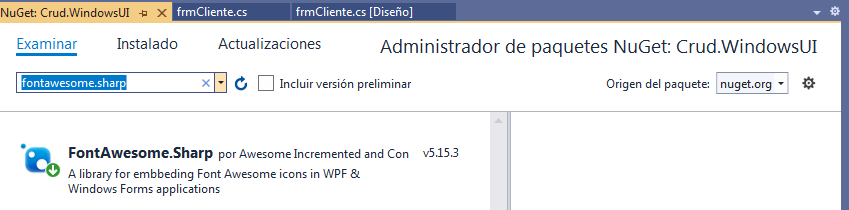
5.1 Requisitos

Instalar desde el administrador de paquetes NuGet:


5.2 Diseño


5.3 frmCliente.cs

Clase que contendrá la lógica de interfaz de usuario


using System;
using System.Collections.Generic;
using System.ComponentModel;
using System.Data;
using System.Drawing;
using System.Linq;
using System.Text;
using System.Threading.Tasks;
using System.Windows.Forms;
using MetroFramework.Forms;
using FontAwesome.Sharp;
using Crud.BusinessEntities;
using Crud.BusinessLogic;
using MetroFramework.Controls;


namespace Crud.WindowsUI
{
    public partial class frmCliente : MetroForm
    {
        private DataTable dtListado;
        private string Accion = string.Empty;

        struct ValorAccion {
            public const string NUEVO = "N";
            public const string MODIFICAR = "M";
            public const string ELIMINAR = "E";
            public const string GUARDAR = "G";
            public const string DESHACER = "D";
            public const string DEFAULT = "";

            public const string CONTROL_LIMPIAR = "1";
            public const string CONTROL_ENLAZAR_DATOS = "2";
            public const string CONTROL_DESENLAZAR_DATOS = "3";
            public const string CONTROL_HABILITAR = "4";
            public const string CONTROL_INHABILITAR = "5";
        }

        public frmCliente()
        {
            InitializeComponent();
            CargarIconos();
            this.BringToFront();
        }


        private void frmCliente_Load(object sender, EventArgs e)
        {
            try
            {
                CargarCombos();
                ListarCliente();
                AccionMantenimiento(ValorAccion.DEFAULT);
                FormatoGrilla();
            }
            catch (Exception ex)
            {
                MessageBox.Show(ex.Message);
                throw;
            }
            
        }


        private void btnNuevo_Click(object sender, EventArgs e)
        {
            Accion = ValorAccion.NUEVO;
            AccionMantenimiento(Accion);
            txtIdCliente.ReadOnly = true;
            txtDescCliente.Focus();
        }

        private void btnEditar_Click(object sender, EventArgs e)
        {
            if (dtListado.Rows.Count == 0)
                return;

            Accion = ValorAccion.MODIFICAR;
            AccionMantenimiento(Accion);
            txtIdCliente.ReadOnly = true;
            txtDescCliente.Focus();
        }

        private void btnEliminar_Click(object sender, EventArgs e)
        {
            if (dtListado.Rows.Count == 0)
                return;

            string mensaje = "¿Está seguró de eliminar el registro?";
            if (MetroFramework.MetroMessageBox.Show(this,mensaje,"Confirmación",MessageBoxButtons.YesNo,MessageBoxIcon.Question) == DialogResult.Yes)
            {
                try
                {
                    if (BL_Cliente.DeleteCliente(txtIdCliente.Text.Trim()))
                        Exito();
                }
                catch (Exception ex)
                {
                    MetroFramework.MetroMessageBox.Show(this, ex.Message, "Error", MessageBoxButtons.OK, MessageBoxIcon.Error);
                    throw;
                }
            }
        }

        private void btnGuardar_Click(object sender, EventArgs e)
        {
            if (!bValidar())
                return;

            try
            {
                string mensaje = "¿Está seguro de guardar el registro?";

                if (MetroFramework.MetroMessageBox.Show(this, mensaje,"Confirmación", MessageBoxButtons.YesNo, MessageBoxIcon.Question) == DialogResult.Yes)
                {
                    BE_Cliente Cliente = new BE_Cliente();
                    Cliente.idCliente = txtIdCliente.Text.Trim();
                    Cliente.dsCliente = txtDescCliente.Text.Trim();
                    Cliente.dsNumDoc = txtNroDoc.Text.Trim();
                    Cliente.dsSexo = Convert.ToString(cboSexo.SelectedValue);
                    Cliente.dsDireccion = txtDireccion.Text.Trim();
                    Cliente.dsTelefono = txtTelefono.Text.Trim();
                    Cliente.dsCorreo = txtCorreo.Text.Trim();

                    Cliente.feNacimiento = dtpFechaNacimiento.Checked ? (DateTime)dtpFechaNacimiento.Value
                        : (DateTime)dtpFechaNacimiento.MinDate;
                    Cliente.dsEstado = Convert.ToString(cboEstado.SelectedValue);

                    if (Accion == ValorAccion.NUEVO)
                    {
                        Cliente.idCliente = BL_Cliente.GenerarIdCliente();
                        if (BL_Cliente.InsertaCliente(Cliente))
                        {
                            Exito();
                        }
                    }

                    if (Accion == ValorAccion.MODIFICAR)
                    {
                        if (BL_Cliente.ActualizarCliente(Cliente))
                        {
                            Exito();
                        }
                    }
                }
            }
            catch (Exception ex)
            {
                MessageBox.Show(ex.Message);
                throw;
            }

            
        }

        private void Exito()
        {
            MetroFramework.MetroMessageBox.Show(this, "Se guardaron los datos correctamente",
                                "Exito", MessageBoxButtons.OK, MessageBoxIcon.Information);
            ListarCliente();
            AccionMantenimiento(ValorAccion.DEFAULT);
            Accion = string.Empty;
        }

        private void btnDeshacer_Click(object sender, EventArgs e)
        {
            Accion = ValorAccion.DESHACER;
            AccionMantenimiento(Accion);
        }

        private void btnPrimero_Click(object sender, EventArgs e)
        {
            Primero();
        }

        private void btnAnterior_Click(object sender, EventArgs e)
        {
            Anterior();
        }

        private void btnSiguiente_Click(object sender, EventArgs e)
        {
            Siguiente();
        }

        private void btnUltimo_Click(object sender, EventArgs e)
        {
            Ultimo();
        }

       private void btnBuscar_Click(object sender, EventArgs e)
        {
            ListarCliente();
            RutinaControlesDatos(ValorAccion.CONTROL_DESENLAZAR_DATOS);
            RutinaControlesDatos(ValorAccion.CONTROL_ENLAZAR_DATOS);
            RutinaControlesDatos(ValorAccion.CONTROL_INHABILITAR);
        }

        private void Primero() {
            BindingContext[dtListado, string.Empty].Position = 0;
        }
        private void Anterior()
        {
            BindingContext[dtListado, string.Empty].Position -= 1;
        }
        private void Siguiente()
        {
            BindingContext[dtListado, string.Empty].Position += 1;
        }
        private void Ultimo()
        {
            BindingContext[dtListado, string.Empty].Position = BindingContext[dtListado, string.Empty].Count-1;
        }

        private void CargarCombos()
        {
            try
            {
                cboSexo.DataSource = BL_Cliente.ListarSexo();
                cboSexo.ValueMember = "codigo";
                cboSexo.DisplayMember = "descripcion";

                cboEstado.DataSource = BL_Cliente.ListarEstado();
                cboEstado.ValueMember = "codigo";
                cboEstado.DisplayMember = "descripcion";
            }
            catch (Exception ex)
            {
                MessageBox.Show(ex.Message);
                throw;
            }


        }

        private void ListarCliente() {
            dtListado = BL_Cliente.ListarClientes(txtBuscar.Text.Trim());
            dgListado.DataSource = dtListado;
            Primero();
            if (dtListado.Rows.Count == 0)
            {
                RutinaControlesDatos(ValorAccion.CONTROL_LIMPIAR);
            }
        }

        private void AccionMantenimiento(string strAccion)
        {
            switch (strAccion)
            {
                case ValorAccion.NUEVO:
                    btnNuevo.Enabled = false;
                    btnEditar.Enabled = false;
                    btnEliminar.Enabled = false;
                    btnGuardar.Enabled = true;
                    btnDeshacer.Enabled = true;
                    btnPrimero.Enabled = false;
                    btnAnterior.Enabled = false;
                    btnSiguiente.Enabled = false;
                    btnUltimo.Enabled = false;

                    txtBuscar.ReadOnly = true;
                    txtBuscar.ResetText();
                    btnBuscar.Enabled = false;
                    dgListado.Enabled = false;

                    RutinaControlesDatos(ValorAccion.CONTROL_LIMPIAR);
                    RutinaControlesDatos(ValorAccion.CONTROL_DESENLAZAR_DATOS);
                    RutinaControlesDatos(ValorAccion.CONTROL_HABILITAR);
                    break;
                case ValorAccion.MODIFICAR:
                    btnNuevo.Enabled = false;
                    btnEditar.Enabled = false;
                    btnEliminar.Enabled = false;
                    btnGuardar.Enabled = true;
                    btnDeshacer.Enabled = true;
                    btnPrimero.Enabled = false;
                    btnAnterior.Enabled = false;
                    btnSiguiente.Enabled = false;
                    btnUltimo.Enabled = false;

                    txtBuscar.ReadOnly = true;
                    txtBuscar.ResetText();
                    btnBuscar.Enabled = false;
                    dgListado.Enabled = false;

                    RutinaControlesDatos(ValorAccion.CONTROL_DESENLAZAR_DATOS);
                    RutinaControlesDatos(ValorAccion.CONTROL_HABILITAR);
                    break;

                case ValorAccion.DESHACER:
                    btnNuevo.Enabled = true;
                    btnEditar.Enabled = true;
                    btnEliminar.Enabled = true;
                    btnGuardar.Enabled = false;
                    btnDeshacer.Enabled = false;
                    btnPrimero.Enabled = true;
                    btnAnterior.Enabled = true;
                    btnSiguiente.Enabled = true;
                    btnUltimo.Enabled = true;

                    txtBuscar.ReadOnly = false;
                    txtBuscar.ResetText();
                    btnBuscar.Enabled = true;
                    dgListado.Enabled = true;

                    RutinaControlesDatos(ValorAccion.CONTROL_ENLAZAR_DATOS);
                    RutinaControlesDatos(ValorAccion.CONTROL_INHABILITAR);
                    break;
                default:
                    btnNuevo.Enabled = true;
                    btnEditar.Enabled = true;
                    btnEliminar.Enabled = true;
                    btnGuardar.Enabled = false;
                    btnDeshacer.Enabled = false;
                    btnPrimero.Enabled = true;
                    btnAnterior.Enabled = true;
                    btnSiguiente.Enabled = true;
                    btnUltimo.Enabled = true;

                    txtBuscar.ReadOnly = false;
                    txtBuscar.ResetText();
                    btnBuscar.Enabled = true;
                    dgListado.Enabled = true;

                    RutinaControlesDatos(ValorAccion.CONTROL_DESENLAZAR_DATOS);
                    RutinaControlesDatos(ValorAccion.CONTROL_ENLAZAR_DATOS);
                    RutinaControlesDatos(ValorAccion.CONTROL_INHABILITAR);
                    break;
            }
        }

        private void RutinaControlesDatos(string strParam)
        {
            foreach (var ctl in gbDatos.Controls)
            {

                if (ctl is MetroTextBox)
                {
                    var txt = (MetroTextBox)ctl;
                    switch (strParam)
                    {
                        case ValorAccion.CONTROL_LIMPIAR:
                            txt.ResetText();
                            break;
                        case ValorAccion.CONTROL_ENLAZAR_DATOS:
                            if (txt.Tag != null)
                            {
                                txt.DataBindings.Add(new Binding("Text", dtListado, txt.Tag.ToString()));
                            }
                            break;
                        case ValorAccion.CONTROL_DESENLAZAR_DATOS:
                            txt.DataBindings.Clear();
                            break;
                        case ValorAccion.CONTROL_HABILITAR:
                            txt.ReadOnly = false;
                            break;
                        case ValorAccion.CONTROL_INHABILITAR:
                            txt.ReadOnly = true;
                            break;
                        default:
                            break;
                    }
                }
                if (ctl is MetroComboBox)
                {
                    var cbo = (MetroComboBox)ctl;
                    switch (strParam)
                    {
                        case ValorAccion.CONTROL_LIMPIAR:
                            cbo.SelectedIndex = -1;
                            break;
                        case ValorAccion.CONTROL_ENLAZAR_DATOS:
                            if (cbo.Tag != null)
                            {
                                cbo.DataBindings.Add(new Binding("SelectedValue", dtListado, cbo.Tag.ToString()));
                            }
                            break;
                        case ValorAccion.CONTROL_DESENLAZAR_DATOS:
                            cbo.DataBindings.Clear();
                            break;
                        case ValorAccion.CONTROL_HABILITAR:
                            cbo.Enabled = true;
                            break;
                        case ValorAccion.CONTROL_INHABILITAR:
                            cbo.Enabled = false;
                            break;
                        default:
                            break;
                    }
                }
                if (ctl is MetroDateTime)
                {
                    var dtp = (MetroDateTime)ctl;
                    switch (strParam)
                    {
                        case ValorAccion.CONTROL_LIMPIAR:
                            dtp.Text = string.Empty;
                            break;
                        case ValorAccion.CONTROL_ENLAZAR_DATOS:
                            if (dtp.Tag != null)
                            {
                                dtp.DataBindings.Add(new Binding("Text", dtListado, dtp.Tag.ToString()));
                            }
                            break;
                        case ValorAccion.CONTROL_DESENLAZAR_DATOS:
                            dtp.DataBindings.Clear();
                            break;
                        case ValorAccion.CONTROL_HABILITAR:
                            dtp.Enabled = true;
                            break;
                        case ValorAccion.CONTROL_INHABILITAR:
                            dtp.Enabled = false;
                            break;
                        default:
                            break;
                    }
                }
            }
        }

        private void CargarIconos()
        {
            var imgForm = IconChar.UserAlt.ToBitmap(IconFont.Auto, 32, Color.Silver);
            this.Icon = System.Drawing.Icon.FromHandle(imgForm.GetHicon());

            var imgCliente = IconChar.User.ToBitmap(IconFont.Auto, 16, Color.DarkGray);
            var imgDocumento = IconChar.AddressCard.ToBitmap(IconFont.Auto, 16, Color.DarkGray);
            var imgDireccion = IconChar.MapMarkedAlt.ToBitmap(IconFont.Auto, 16, Color.DarkGray);
            var imgTelefono = IconChar.Phone.ToBitmap(IconFont.Auto, 16, Color.DarkGray);
            var imgCorreo = IconChar.Envelope.ToBitmap(IconFont.Auto, 16, Color.DarkGray);

            txtDescCliente.Icon = imgCliente;
            txtNroDoc.Icon = imgDocumento;
            txtDireccion.Icon = imgDireccion;
            txtTelefono.Icon = imgTelefono;
            txtCorreo.Icon = imgCorreo;

        }

        private void FormatoGrilla()
        {
            foreach (DataGridViewColumn col in dgListado.Columns)
            {
                col.Visible = false;
                col.SortMode = DataGridViewColumnSortMode.NotSortable;

            }

            dgListado.Columns["idCliente"].Visible = true;
            dgListado.Columns["idCliente"].HeaderText = "ID";

            dgListado.Columns["dsCliente"].Visible = true;
            dgListado.Columns["dsCliente"].HeaderText = "Cliente";

            dgListado.Columns["dsEstado"].Visible = true;
            dgListado.Columns["dsEstado"].HeaderText = "Estado";
        }

        private bool bValidar()
        {
            if (string.IsNullOrEmpty(txtDescCliente.Text.Trim()))
            {
                MetroFramework.MetroMessageBox.Show(this,"Ingrese descripción de cliente","Error",
                    MessageBoxButtons.OK,MessageBoxIcon.Error);
                txtDescCliente.Focus();
                return false;
            }

            if (cboEstado.SelectedIndex == -1)
            {
                MetroFramework.MetroMessageBox.Show(this, "Seleccione estado", "Error",
                    MessageBoxButtons.OK, MessageBoxIcon.Error);
                cboEstado.Focus();
                return false;
            }

            return true;
        
        }

    }
}


Video completo del tutorial en mi canal

Copyright © 2021 TRUJILLOSOFT